Clean up Mac caches and temporary files
MintDisk scans caches and logs that macOS and your apps can rebuild, plus old installers in your Downloads folder, explains each item, and pre-selects only the ones rated Safe.
Scanning is free. Cleaning and deleting are included in the free 7-day trial and in Pro.
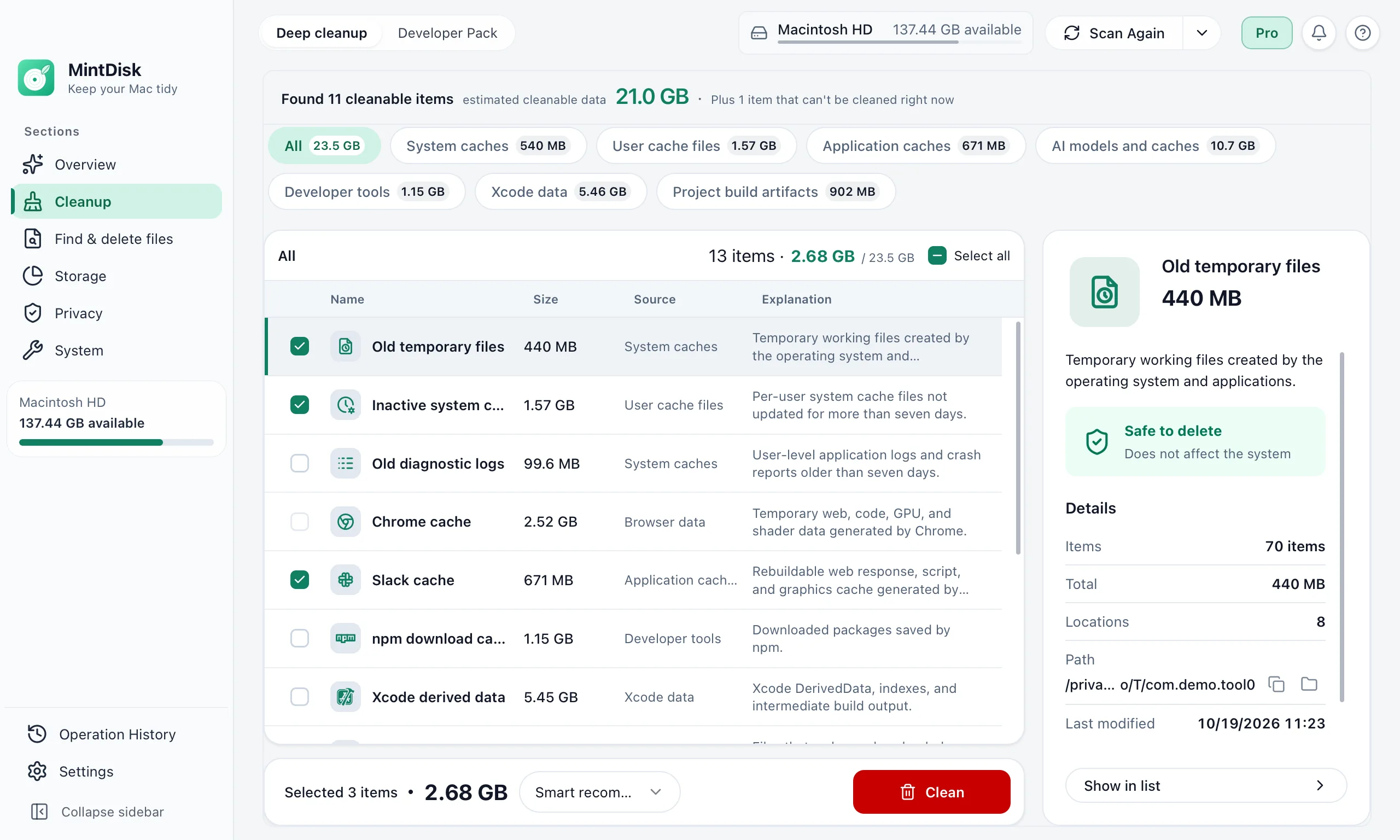
How the Mac junk file cleaner works
- 1
Scan
A read-only scan checks system caches, browser and app caches, old logs and developer caches. Nothing is deleted while scanning.
- 2
Review
Each item shows its size, locations and what it is. Smart selection ticks only items rated Safe; items marked Review first are left for you to decide.
- 3
Clean
Confirm the plan and MintDisk removes the selected items; the button says where they go. Apps that must be closed are listed first, and items of apps that are still running are skipped.
When it helps
Browser caches
Chrome, Edge, Firefox, Arc, Brave, Opera and Vivaldi keep large caches of web pages and media.
Chat and meeting apps
Slack, Teams, Zoom, Discord and others store caches that grow with every call and channel.
Developer caches
Xcode DerivedData, npm, Homebrew, Gradle and CocoaPods caches can take many gigabytes.
Good to know
- Caches, logs and temporary files are deleted permanently, which is why only items that can be rebuilt are listed. App leftovers go to the Recovery area while it is on, and downloaded installers go to the Trash.
- Apps rebuild their caches as you use them, so some space comes back over time, and the first launch after cleaning can be slower.
- Without Full Disk Access, some caches and logs, such as Mail, Messages and Safari data, are not scanned.
- MintDisk does not empty your Trash or remove files that macOS protects.
Questions and answers
Is it safe to clear caches on a Mac?
Caches are copies that apps can recreate. MintDisk lists only caches covered by its cleanup rules, rates each one Safe or Review first, and pre-selects only the Safe ones.
Can I undo a cleanup?
Not for caches: they are deleted permanently, and apps rebuild them. App leftovers can be restored from the Recovery area while it is on, and downloaded installers from the Trash or from History.
Which apps does it clean?
System caches and old logs, browsers such as Chrome, Edge, Firefox, Arc and Brave, apps such as Slack, Teams, Zoom, Discord and Office, and developer tools such as Xcode, npm and Homebrew.
Is deep cleanup free?
Scanning is free. Cleaning needs the free 7-day trial or a Pro license.
Keep exploring
Try it on your Mac
MintDisk runs on macOS 12 or later, on Apple silicon and Intel Macs. Start the 7-day trial in the app, no card needed.