Find large files on your Mac
MintDisk lists the large files taking up space on your Mac, on a disk or in the folders you choose, grouped by type, so you can decide what to keep.
Scanning is free. Cleaning and deleting are included in the free 7-day trial and in Pro.
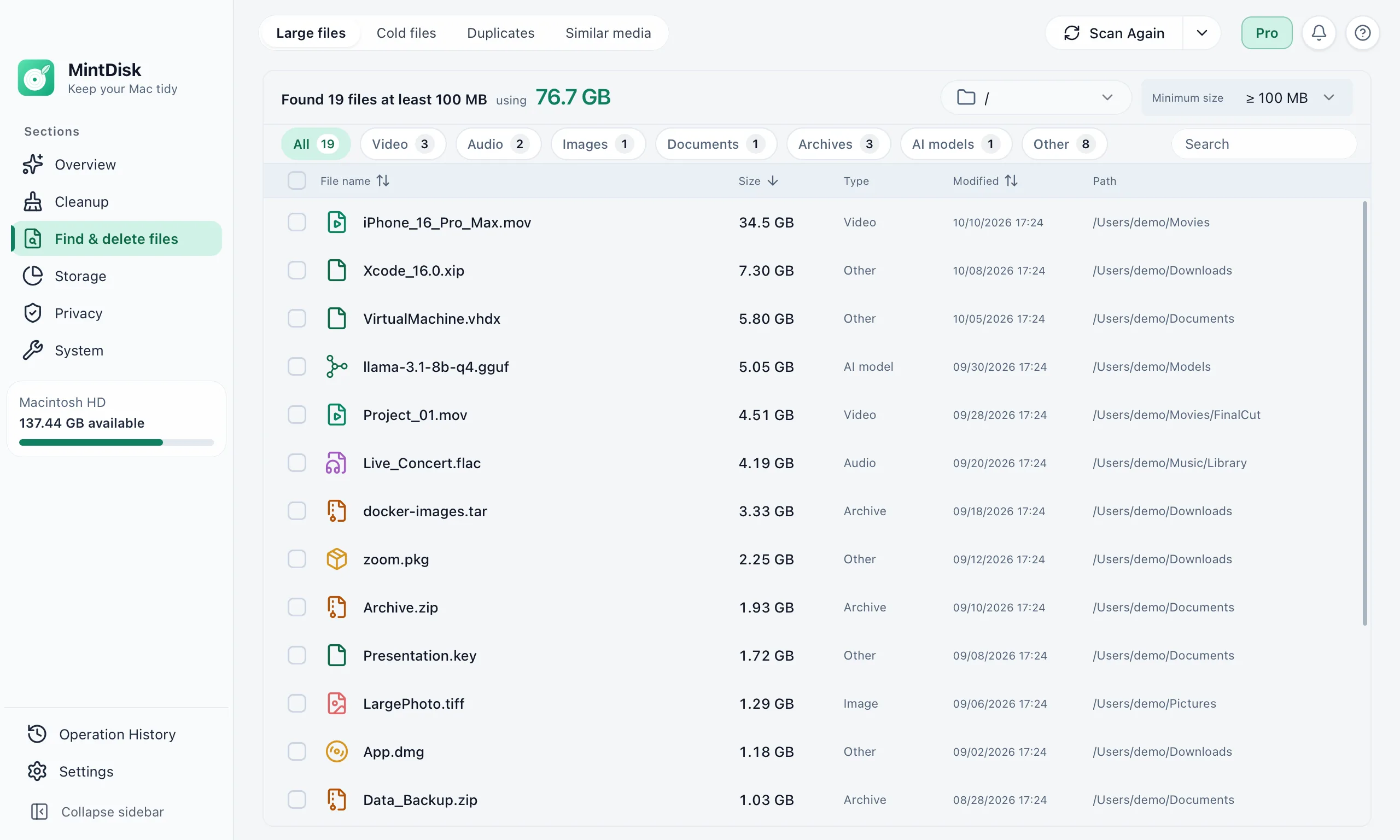
How the large file finder for Mac works
- 1
Choose locations and a minimum size
Scan a whole disk or several folders at once. The minimum size is 100 MB by default and can be set to 50 MB, 500 MB, 1 GB or 5 GB.
- 2
Filter and sort
Show only videos, audio, images, documents, archives or AI models, search by name, and sort by size, name or date.
- 3
Review and remove
Preview a file with Quick Look or show it in Finder. Selected files go to the Trash by default, and files that changed after the scan are skipped.
When it helps
Old videos and recordings
Screen recordings, exports and camera videos are often the largest files on a Mac.
Installers left in Downloads
Disk images, packages and archives you no longer need after installing an app.
Files you have not opened for months
The Cold files tab finds large files not used for 30 to 365 days, and can compress them to ZIP, move or delete them.
Good to know
- The minimum size is chosen from presets; there is no custom value.
- Quick scan uses Spotlight and can miss files that are not indexed yet. Run a Complete scan to check every folder.
- A scan lists up to 2,000 files.
- System folders such as /bin and /usr are never listed.
Questions and answers
Is the large file finder free?
Yes. Scanning and viewing the list stay free, also after the trial. Deleting, moving or compressing files needs the free 7-day trial or a Pro license.
Where do deleted files go?
To the Trash by default. If you choose Delete permanently, MintDisk asks again and, while your trial or license is active, keeps the files in the Recovery area for 30 days (1 to 90 days, set in History › Recovery area) so you can restore them.
What is the difference between Quick and Complete scan?
Quick scan asks Spotlight for large files, which is fast but can miss files that are not indexed yet. Complete scan walks every folder in the locations you chose.
Can I scan an external drive?
Yes. Choose the drive or any folder on it as the location, alone or together with other folders.
Keep exploring
Try it on your Mac
MintDisk runs on macOS 12 or later, on Apple silicon and Intel Macs. Start the 7-day trial in the app, no card needed.