Reclaim disk space from developer caches
MintDisk finds the dependency and build folders of projects you have not touched for a while, plus Xcode, Docker and local AI model storage, and shows how each one comes back.
Scanning is free. Cleaning and deleting are included in the free 7-day trial and in Pro.
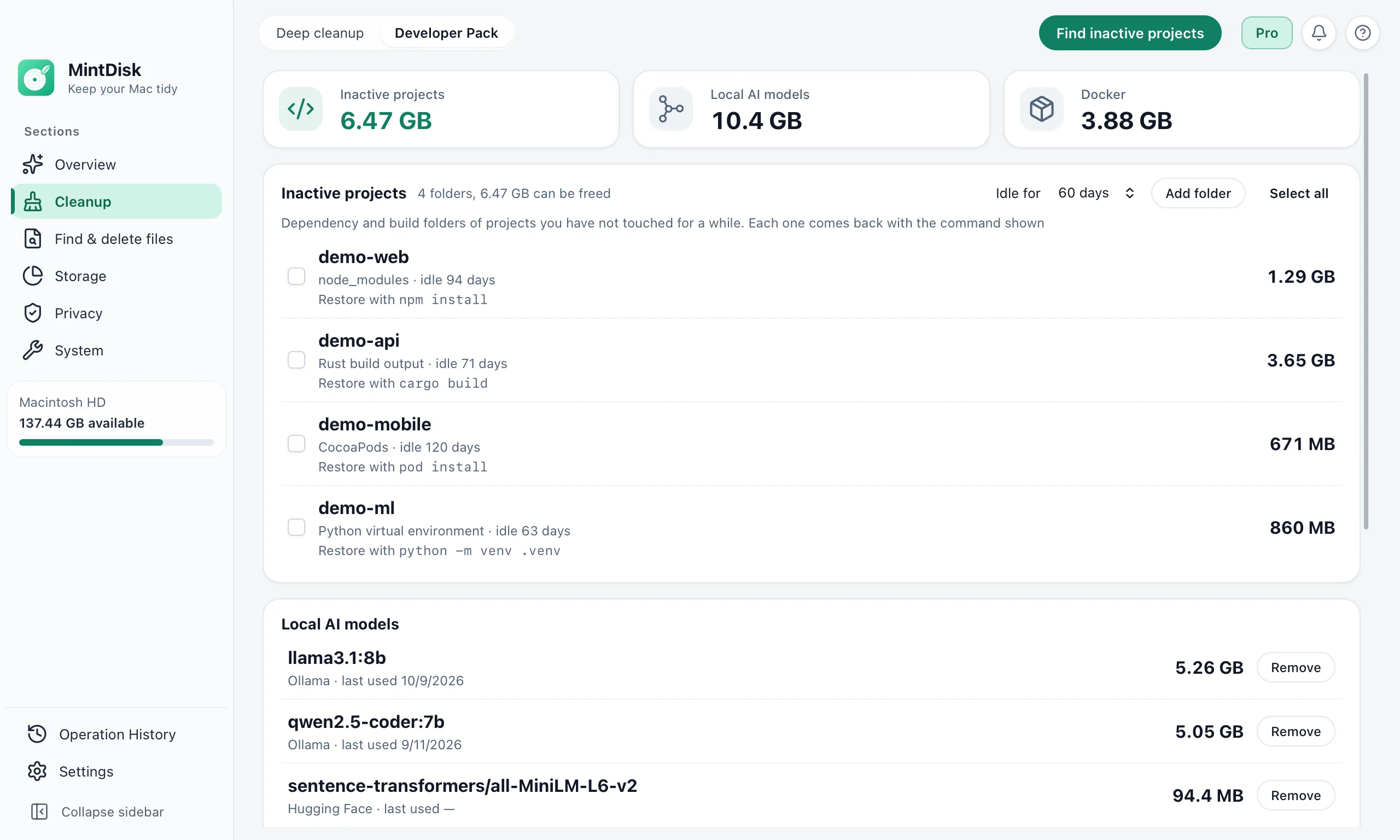
The Developer Pack in 20 seconds
How developer disk cleanup on Mac works
- 1
Find inactive projects
Developer Pack looks in folders such as ~/Developer, ~/Projects and ~/Code, plus folders you add, for projects idle for 30, 60, 90 or 180 days.
- 2
See what comes back
Each folder shows its size, how long the project has been idle and the command that restores it, such as npm install, cargo build or pod install.
- 3
Remove what you don't need
Selected project folders go to the Trash. Your source files are never touched, and each folder is checked again right before it is removed.
When it helps
Old JavaScript projects
node_modules, .next and .nuxt folders of projects you no longer work on. The restore command follows your lockfile: npm, pnpm, yarn or bun.
Rust, Gradle, CocoaPods, Python and Flutter
Rust target folders, .gradle, Pods, Python virtual environments and .dart_tool folders.
Xcode, Docker and local AI models
Unavailable simulators, dangling Docker images, stopped containers, and Ollama or Hugging Face models. Deep cleanup adds Xcode DerivedData and caches of npm, Homebrew, Cargo, Gradle and more.
Developer tools in detail
- Clean node_modulesnode_modules, .next and .nuxt of inactive projects, plus npm, pnpm, Yarn and Bun caches.
- Rust target directory cleanuptarget folders of inactive Cargo projects, Cargo caches and unused toolchains.
- Docker disk cleanup on MacDangling images, stopped containers and unused build cache; volumes are never touched.
- Clean Xcode DerivedDataDerivedData, old DeviceSupport, simulator caches and unavailable simulators.
- Ollama disk space cleanupEach local model with its size and last use; shared layers are kept.
- Hugging Face cache cleanupDownloaded model repositories with their size and last use.
Good to know
- Docker cleanup needs Docker running. It removes only untagged unused images and stopped containers; volumes and tagged images are never touched.
- Docker data, Ollama models and Xcode simulators are removed permanently. Project folders and Hugging Face models go to the Trash.
- Developer Pack does not read git status. It lists only dependency and build folders next to their project file, so review the list if you keep anything else in them.
- Projects are found up to six folders deep, in the default locations and in folders you add in your home folder or on an external drive.
- The Xcode simulators section appears only when Xcode's command line tools are installed.
Questions and answers
Is it safe to delete node_modules?
For a project you can reinstall, yes: node_modules holds downloaded packages, and npm install (or pnpm, yarn or bun) brings them back from your lockfile. MintDisk shows that command next to each folder and moves the folder to the Trash.
How does MintDisk decide a project is inactive?
It looks at the newest change to the project's own files and at recent git activity. If nothing changed during the idle period you choose, 60 days by default, the project is listed.
Does it clean Xcode DerivedData?
Yes, in Deep cleanup, together with device support files and simulator caches; Xcode archives are shown for review only and never cleaned. Developer Pack removes simulators whose runtime is no longer installed.
What does Docker cleanup remove?
Dangling images, which are untagged and unused, and stopped containers, through Docker's own prune commands. Volumes, tagged images and running containers are not touched.
Is developer cleanup free?
Scanning is free. Removing folders, models or Docker data needs the free 7-day trial or a Pro license.
Keep exploring
Try it on your Mac
MintDisk runs on macOS 12 or later, on Apple silicon and Intel Macs. Start the 7-day trial in the app, no card needed.