Reclaim space from Node.js projects
MintDisk finds node_modules in projects you have not touched for weeks and shows the install command that restores them. Package caches are covered too.
Scanning is free. Cleaning and deleting are included in the free 7-day trial and in Pro.
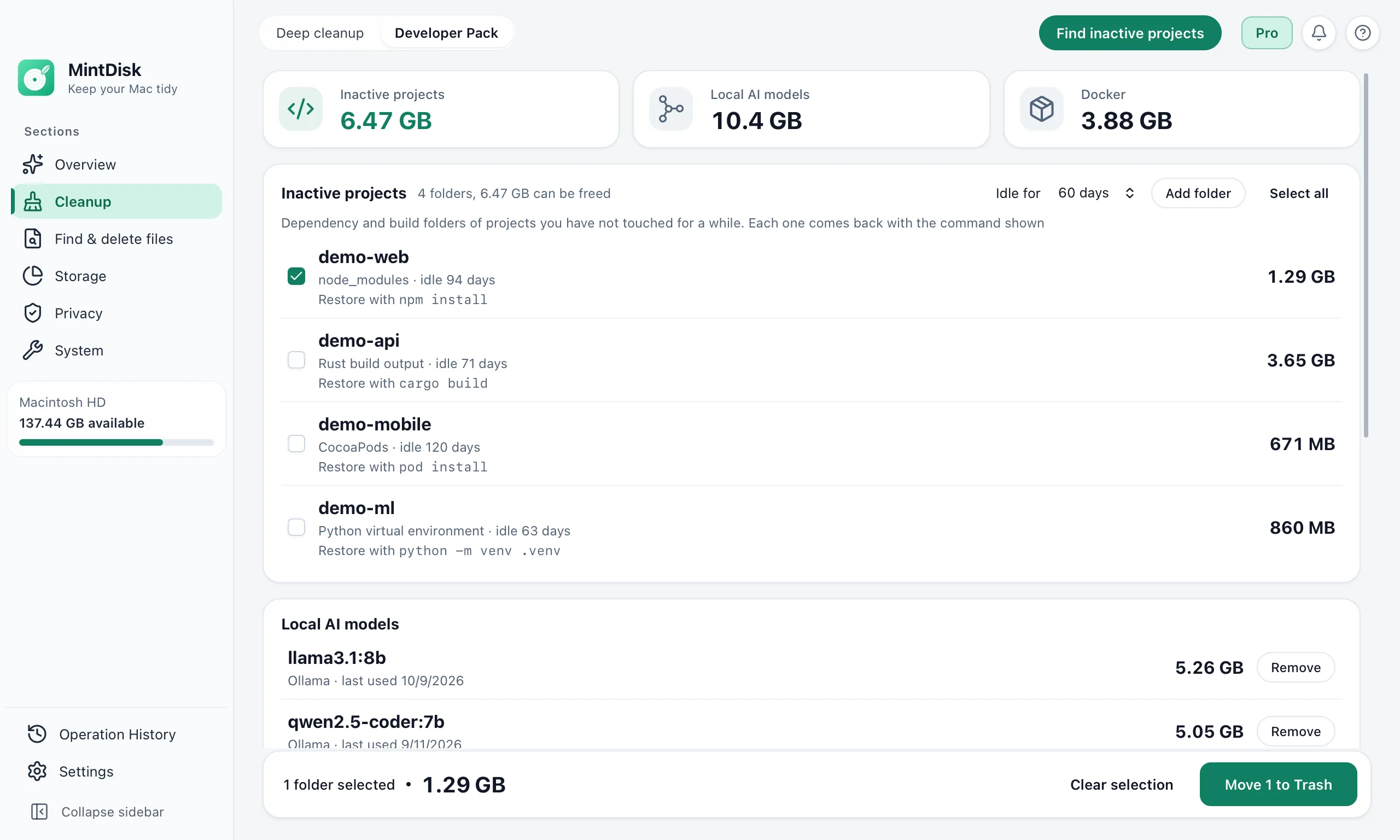
How to clean node_modules with MintDisk
- 1
Find inactive projects
Developer Pack looks in folders such as ~/Developer, ~/Projects and ~/Code for projects with a package.json whose files have not changed for 30, 60, 90 or 180 days.
- 2
Check the restore command
Each project shows npm install, pnpm install, yarn install or bun install, based on its lockfile. .next and .nuxt folders are listed too.
- 3
Move to the Trash
Selected node_modules folders go to the Trash. package.json, the lockfile and your source are not touched.
When it helps
Old side projects
Hundreds of megabytes of node_modules per project add up across many repositories.
npm cache cleanup
Deep cleanup lists the npm cache, the pnpm store and the Yarn and Bun caches, which package managers download again when needed.
Next.js and Nuxt build output
.next and .nuxt folders of inactive projects are found next to node_modules.
Good to know
- A project counts as inactive from the last change to its own files and to git metadata. MintDisk does not check for uncommitted changes.
- node_modules folders from Developer Pack go to the Trash; package caches cleaned in Deep cleanup are deleted permanently.
- Projects are searched up to 6 levels deep in the standard folders and in folders you add; symbolic links are not followed.
- Reinstalling takes time and a network connection.
Questions and answers
Is it safe to remove node_modules?
Yes, when the project still has its package.json: the install command rebuilds node_modules. MintDisk shows that command and checks the folder again before removing it.
How does MintDisk decide a project is inactive?
It looks at the newest change in the project's own files, two levels deep, and at git activity such as HEAD and the index. You choose 30, 60, 90 or 180 days.
Does it clean the npm cache?
Yes. Deep cleanup lists the npm cache and the pnpm store and pre-selects them as recommended; the Yarn and Bun caches are listed but not selected.
Is node_modules cleanup free?
Scanning is free. Removing needs the free 7-day trial or a Pro license.
Keep exploring
Try it on your Mac
MintDisk runs on macOS 12 or later, on Apple silicon and Intel Macs. Start the 7-day trial in the app, no card needed.